
When a sailing gets cancelled, how fast do your passengers find out?

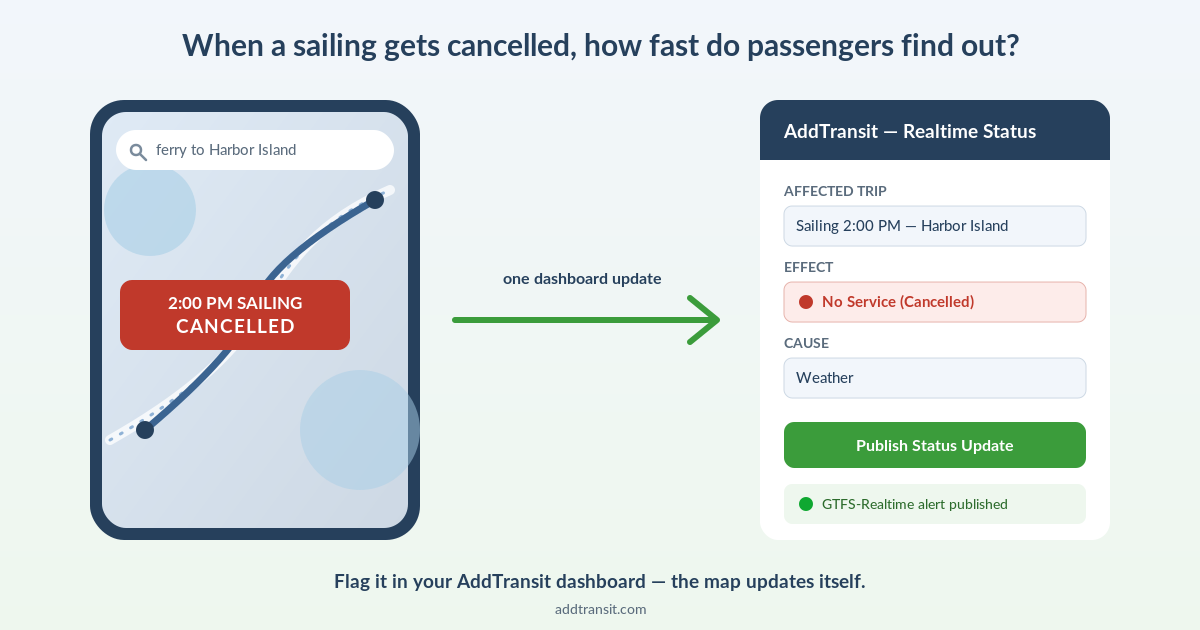
Split screen showing a cancelled 2:00 PM ferry sailing on Google Maps next to the AddTransit dashboard Realtime Status form publishing the same cancellation as a GTFS-Realtime alert

A storm rolls in and you cancel the 2pm sailing. You post it on Facebook. You update the notice board at the terminal. But the family already driving there is looking at Google Maps, which still shows the 2pm departure running on time — because your website and Google Maps have never talked to each other.

That gap, between “we cancelled it” and “the passenger found out,” is where ferry operators lose trust and take the angry phone calls.

Static GTFS vs. GTFS-Realtime, in plain English

Static GTFS is your timetable, published as a feed. It’s what puts your sailings into Google Maps, Apple Maps and other journey planners in the first place — someone searches “ferry to [island]” and your times show up. It’s set up once and updated when your schedule changes.

GTFS-Realtime is the live layer on top: “this specific sailing is delayed,” “this one’s cancelled,” “the vessel is here right now.” It updates continuously, and it’s the part almost no ferry-booking platform produces — which is exactly the part that matters most for a ferry operator.

Why this is a ferry problem more than a bus problem

Ferries are weather-exposed in a way scheduled bus routes usually aren’t. Cancellations and delays are routine across a season, not a rare exception. And a cancelled sailing strands people who are often already at the terminal, having driven there — the cost of stale information is higher than a bus you just catch ten minutes later. Add in seasonal or tidal schedule changes, and you’ve got exactly the conditions where a live feed earns its keep.

For a ferry operator, GTFS-Realtime isn’t telemetry for its own sake — it’s cancellation communication that reaches the passenger where they’re already looking, the map, without spending anything extra on ads or SMS to do it.

“But I already post cancellations on Facebook and our website”

Sure — and that reaches people who already follow you, or think to go check. It doesn’t reach the passenger who searched once, weeks ago, and is now mid-journey with the map open. That’s a different audience, and it’s one you can’t otherwise touch. A GTFS-Realtime feed also flows through to any other transit app or journey planner that consumes it, so one update multiplies out further than a single social post.

What it actually takes

You don’t hand-code any of this. In AddTransit, a cancellation or delay is flagged as a Realtime Status update from your dashboard — you choose what’s affected (a route, a trip, a stop) and why, and that becomes a real GTFS-Realtime Service Alert, the same standard Google Maps and other journey planners read. It’s a short form, not something you or your IT team have to touch. Behind the scenes, GTFS-Realtime feeds use a technical format called protobuf, the same one Google Maps requires — normally something you’d need a software engineer to produce.

AddTransit generates it for you automatically the moment you publish the update, so you get a real, spec-compliant feed without writing a line of code. It is a deliberate step from your dashboard rather than something that fires itself, though — so it’s worth building “flag the cancellation” into your actual weather-day routine, not assuming it happens automatically.

This is what makes AddTransit’s setup comprehensive: static GTFS, the live realtime layer, and ticketing all run from the same platform, on the same feed, under the same account. Your schedule, your live cancellation alerts, and your bookings are connected end to end — not stitched together from separate tools.

Is this for you?

If you run two sailings a day on a timetable that basically never changes, static GTFS alone is probably enough, and you don’t need to think about GTFS-Realtime any further. If your season is weather-driven and your phone rings every time the map is wrong, the realtime layer is the difference between passengers finding out from Google Maps and finding out from an angry voicemail.

See how a flagged cancellation becomes a live map update →

This post is written by the AddTransit team — we build the GTFS + GTFS-Realtime + ticketing platform described above, so take the framing with that in mind. The underlying gap between static and real-time GTFS is real whichever tool you use.
GTFS for Rural and Tribal Transit Agencies: What the 2026 NTD Requirement Means for You

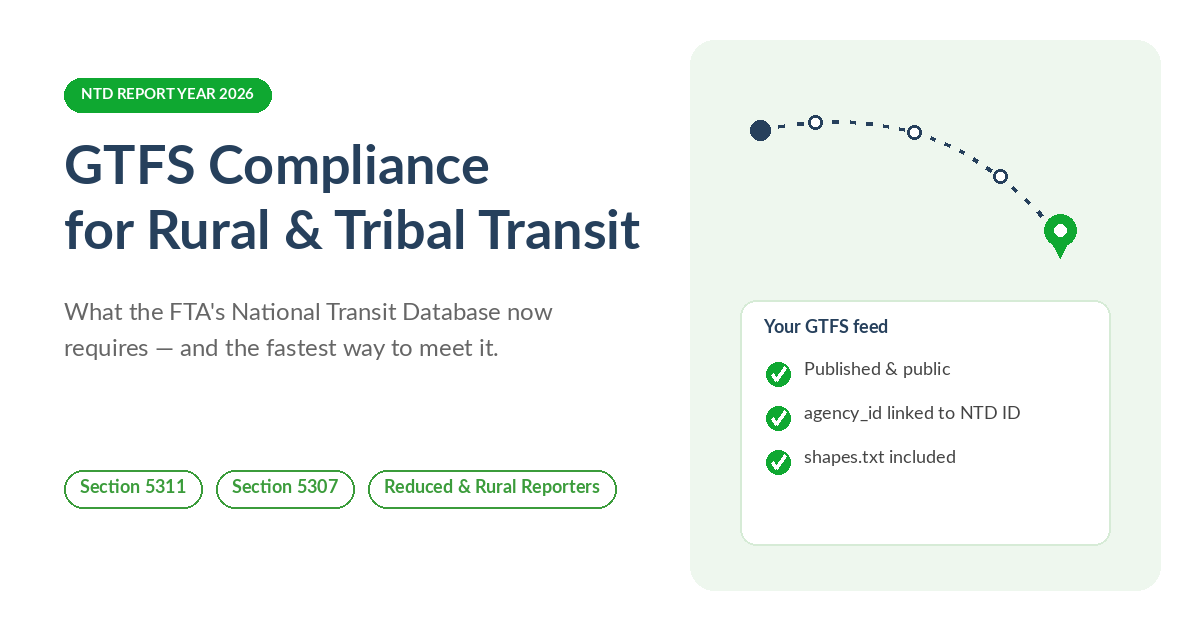
GTFS compliance checklist for rural and tribal transit agencies: published feed, agency_id linked to NTD ID, shapes.txt included

If you run a small public transit system in a rural county, or serve a tribal community, and your agency receives federal formula funding to do it, there is a compliance item landing this year that is easy to miss: the Federal Transit Administration’s National Transit Database (NTD) requires a public GTFS feed for your fixed-route service, and Report Year 2026 is when the newest technical requirements catch up with smaller reporters.

This is not a proposal or a “coming soon.” It is finalized. Here is what it actually says, what changed most recently, and what to do about it — whether or not you ever talk to us about it.

Who this applies to

If your agency is an NTD reporter — generally meaning you receive FTA Urbanized Area (Section 5307) or Rural Area (Section 5311) formula funding — and you operate any fixed-route service, including deviated fixed-route, then NTD requires a public, web-hosted static GTFS feed for that service, plus an annual certification that it is accurate. Demand-response-only operations are not on the hook for this particular requirement, though other NTD reporting rules still apply to them.

What changed for Report Year 2026

FTA finalized a batch of NTD reporting changes in a July 2025 Federal Register notice. Two of those changes tighten the existing GTFS requirement:

  • Your feed’s agency_id field now needs to cross-walk to your agency’s NTD ID (matching the P-50 form).
  • Your feed needs a shapes.txt file — the actual route-line geometry your vehicles drive, not just a list of stops.

Both take effect in Report Year 2025 for full reporters, and Report Year 2026 for reduced, rural and tribal reporters. If your agency reports on that schedule, this reporting year is when it lands on you.

The parts that are easier than they sound

A few things about this requirement are more forgiving than the compliance-deadline framing suggests. Only a static GTFS feed is required — FTA’s own NTD FAQ confirms GTFS-Realtime is optional, not mandatory. A shared regional feed satisfies the requirement as long as it represents all of your reportable service, so if a regional planning body already publishes a combined feed that includes your routes, you may already be covered. And FTA does not expect same-day updates every time a stop moves or a detour happens — what’s actually asked for is an annual certification, as part of your NTD reporting package, that the feed is accurate.

The part that actually trips people up

Stops and routes are a spreadsheet problem. shapes.txt is not — it is the literal line your vehicle drives, point by point, and building it usually means separate GIS software that most one- or two-person transit offices don’t have sitting around. It’s the part of a hand-built feed that most often gets left out or fails validation the first time an agency puts one together.

Where AddTransit fits — and where it doesn’t need to

If your regional MPO or transit association already builds and hosts a GTFS feed that covers your service, you are likely already covered. This isn’t a requirement you need to buy software to satisfy.

If you’d rather not hand-build route geometry in a separate GIS tool, this is exactly the part AddTransit’s GTFS Editor is built to make easy: a built-in route/shape editor lets you draw or import your route, and AddTransit generates a valid shapes.txt from it — then validates and hosts the finished feed for $15 per route per month, no setup fee to start building. If your NTD deadline is close and you’d rather send us a timetable than build anything yourself, the Setup-as-a-Service Basic package ($199) covers the whole job: import, build, validate and publish.

We’ve put the fuller checklist — what’s required, what changed, and both paths through it — on one page: GTFS Compliance for Rural & Tribal Transit Agencies.

The short version

If you take FTA Section 5311 or 5307 formula money and run fixed-route service, you need a public GTFS feed, certified annually, and as of this reporting year that feed needs an NTD-ID-matched agency_id and a real shapes.txt. You can build all of that by hand, but the route-line geometry is where most first attempts stumble — and it’s exactly the part we’ve built AddTransit’s GTFS Editor to make simple.

This post is informational, not legal advice. Confirm your agency’s specific reporting obligations with your assigned NTD analyst.

What’s new in AddTransit: June 2026 product update

What's new in AddTransit — June 2026 product update

We’ve been shipping steadily across AddTransit. Here’s a roundup of what’s new for transit, ferry and tour operators — and a look at what’s coming next.

What’s new

Go live with confidence

Before your public booking page goes live, AddTransit now guides ticketing and tour operators through a quick readiness check — connect Stripe, complete your business profile, and set at least one fare — so your page is fully ready to take real payments from the moment it’s live.

Import very large GTFS feeds in the background

Upload a large GTFS feed and AddTransit imports it in the background while you carry on working. You get a live status page, a choice of best-effort or strict validation, a skipped-row report, and an email the moment it’s done. It comfortably handles feeds into the millions of rows — validated at 1.7 million.

Full support for overnight and after-midnight services

The GTFS editor fully supports cross-midnight stop times (for example 24:30 or 25:10), so late-night and overnight routes build and publish cleanly.

Multi-agency feeds split automatically

Upload a GTFS feed that contains several agencies and AddTransit automatically splits it into a correctly-structured feed for each agency — a real time-saver when you’re onboarding a combined regional feed.

A smoother start for new operators

New operators now get a guided welcome after signing up, plus a self-serve page to submit feed URLs for publishing — so you can get moving straight away.

Faster, more reliable driver apps (iOS 2.2 & Android 7.3)

The latest driver apps bring smooth QR ticket scanning on both iOS and Android, an instant “Boarding confirmed!” prompt after every scan, QR-focused scanning for cleaner reads, and more accurate route-shape GPS. Update from the App Store or Google Play to pick them up.

Tour capacity respected at booking

Tour booking pages now honour each tour’s capacity, so a departure can never be oversold.

Payments that stay in sync

Updating your payment method now settles any outstanding invoice in the same step, so your account stays current automatically — and we’ve made dashboard sessions steadier so you stay logged in while you work, alongside reliability improvements across public booking and real-time status pages.

Refreshed privacy policy and cookie controls

We’ve published an updated privacy policy and clear cookie controls as we expand payments and serve operators in more regions. And behind the scenes, we completed a round of platform-wide security hardening — nothing for you to do; your data and your passengers’ details are better protected as a result.

What’s coming next

Cancel and refund a booking from your dashboard. A one-click cancel-and-refund is on the way, processing the refund and emailing the passenger automatically.

See who’s using your GTFS feed. A dashboard panel showing how often, and by whom, your feed is fetched — a useful signal of your reach and demand.

A refreshed, mobile-friendly plans page. A clearer, value-focused plans page that works beautifully on phones.

One-click Real Time status, with ready-made templates. Add live service status from your dashboard in a click, with templates for posting delays, alerts and updates.

Hands-on help going live with paid bookings. End-to-end booking — signup through Stripe Connect, passenger checkout, manifest and boarding scan — is verified on web and Android, and we’re working one-on-one with operators to get their first real passenger bookings flowing.

New to AddTransit?

AddTransit helps small transit, ferry and tour operators get their services onto Google Maps, sell tickets online, and track their vehicles — without an IT team. You can start building your GTFS feed for free, or explore online ticketing, vehicle tracking and real-time status. New to GTFS? Our step-by-step guide on how to create a GTFS feed walks you through it. If you’d like us to set it up for you, our done-for-you setup service can get you live fast.